
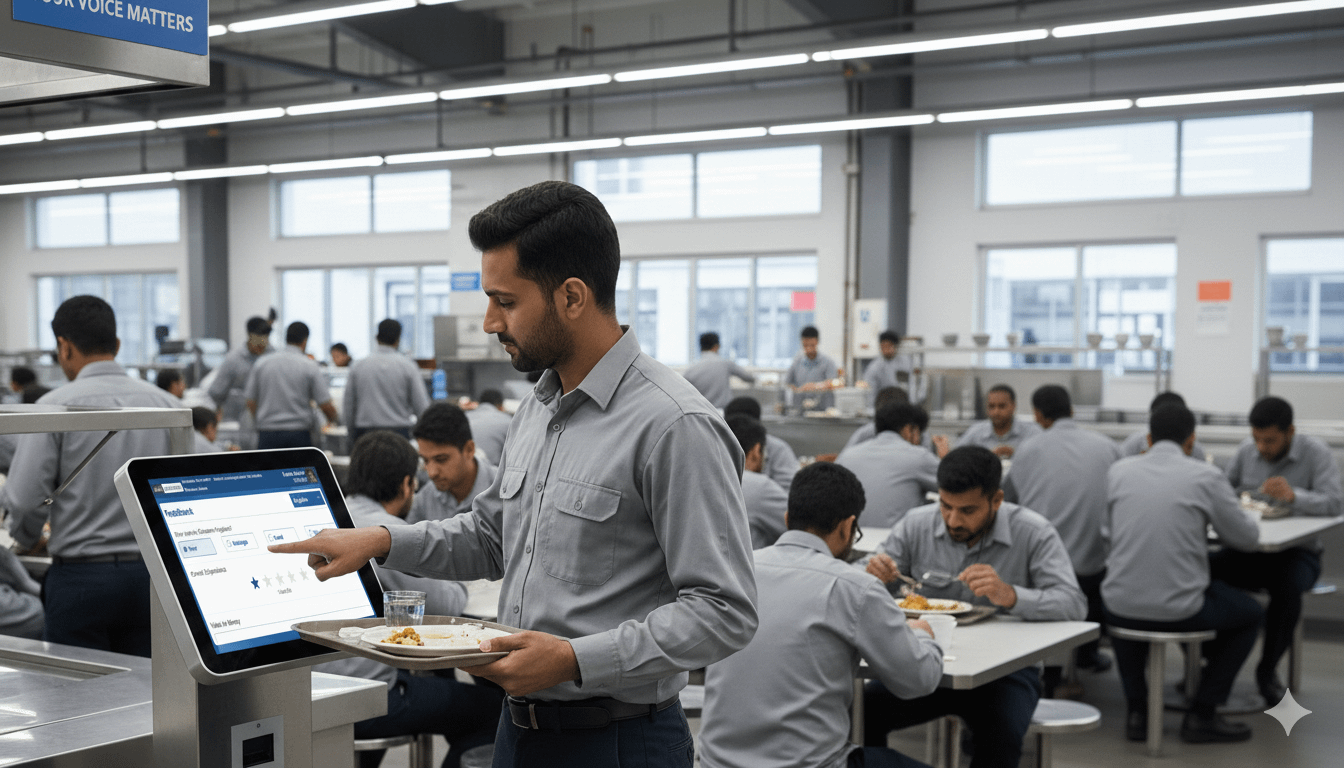
Canteen Feedback Kiosk
In a large corporate campus, a canteen supervisor’s biggest challenge isn’t the kitchen—it’s maintaining consistent quality across multiple canteens, counters, and shifts.
Even when everything is “mostly fine”, a small slip can create big consequences:
- hygiene concerns spread faster than corrective action
- a single poor meal can impact trust and usage
- queues and service delays create daily frustration
- food wastage increases quietly, meal after meal
Most importantly: you rarely get honest feedback at the right time.
That’s exactly where a Canteen Feedback Kiosk helps—because it collects structured feedback from actual canteen users, right after the meal, in under a minute.
As part of the Axis Gatepass Facility Management Suite, our Canteen Feedback Kiosk is built for campuses with multiple canteens and high footfall—corporate offices and industrial units with shift workers.

Why traditional feedback methods fail (especially on large campuses)
Supervisors often rely on:
- informal complaints (only a few people speak up)
- WhatsApp messages (unstructured, hard to act on)
- occasional surveys (too late, too long)
- vendor meetings (based on opinions, not evidence)
The result is either no feedback or feedback that cannot be measured, compared, or improved.
A feedback kiosk flips the system from reactive to proactive:
- more responses
- consistent questions
- clear trends
- actionable insights
What is a Canteen Feedback Kiosk?
A canteen feedback kiosk is a touchscreen placed at a strategic location (usually near the exit / wash area / payment zone) where employees can submit a quick, guided feedback.
Typical feedback parameters include:
- Food taste and quality
- Cleanliness / hygiene
- Drinking water quality
- Serving speed / wait time
- Staff behaviour
- Portion size / value perception
- Recommendation likelihood
- Optional comments/suggestions
The kiosk UI is designed for rush hours: big buttons, minimal steps, and typing only when needed.
Daily Summary Emails
A supervisor-friendly habit that drives improvement
You already send a daily summary to the canteen supervisor, backed by deeper reports in the web application. This is exactly the right operating rhythm.
A well-designed daily email should highlight just what matters. For example:
Top 5 metrics to include in the daily summary
1. Overall satisfaction score (and change vs yesterday / last week)
2. Hygiene/cleanliness score
3. Food taste score
4. Wait time / service speed (distribution or average)
5. Water quality score
Plus:
- response count (participation)
- top 3 complaint reasons
- standout comments (positive + negative)
- canteen-wise comparison (if multiple canteens)
This turns feedback into a daily discipline—not a monthly “post-mortem”.
Bonus:
- hygiene reminders
- “eat healthy” nudges
- motivational / inspiring messages
- canteen etiquette and cleanliness prompts
- rotating campus announcements (optional)
This improves canteen culture without adding extra signage clutter
Anonymous or Employee-Identified
You can run both (as per policy), different organisations prefer different approaches—so the system supports both:

1) Anonymous (or unauthenticated) feedback mode
Best when the client wants:
maximum participation
privacy-first approach
open feedback culture

2) Employee-identified / usage verified feedback mode
Best when the client needs genuine, non-duplicated, “from actual users” feedback.
Employees can be authenticated via:
proximity employee card (fast and familiar)
And where the customer has relevant data available, the kiosk can also verify:
employee attendance for the day
canteen consumption / meal eligibility (if that data is accessible to the application)
This eliminates “fake feedback”, duplicate entries, and non-user inputs—especially important in sensitive setups where canteen quality and hygiene are monitored closely.
Built for multi-canteen campuses (corporate + industrial)
We’ve deployed Canteen Feedback Kiosks across different operating environments, for e.g.:
- A corporate office with ~500 employees and 2 canteens
- An industrial unit with ~1000 workers + ~200 staff using 3 canteens
This kind of mixed environment is exactly where kiosks shine, because you can: - compare canteens fairly
- identify shift-wise issues
- spot vendor/counter-specific patterns
- enforce hygiene focus without relying on random complaints
Best practices to make feedback kiosks succeed
- Keep it short. 8–12 questions is ideal. More than that reduces participation.
- Ask questions supervisors can act on. If you can’t fix it, don’t ask it daily.
- Place kiosks where the moment is natural. Near the exit / wash area is ideal—employees are done eating and can respond quickly.
- Use language options. Participation jumps when employees can choose their preferred language.
- Close the loop. Put a small message near the kiosk or on a notice board: “You said wait time was high → we added an extra serving line 12:30–1:30”. This single practice increases trust and response rates.
What changes for a canteen supervisor?
A kiosk doesn’t just collect “ratings”. It becomes your daily operational control panel.
1) Hygiene and compliance become measurable, not subjective
When management prioritises hygiene, you need early warning signals:
• “Cleanliness” rating trend dipped this week
• comments mention table hygiene after peak time
• water quality perceptions changed suddenly
Instead of waiting for escalation, you can act the same day.
2) Healthy food initiatives get real acceptance data
Many corporates push healthier menus—but adoption depends on taste, portioning, and consistency.
Kiosk feedback helps you answer:
• Which items are getting low taste ratings?
• Which canteen has better acceptance for healthy options?
• Are there repeat complaints about oil/spice/salt?
3) Food wastage reduces (because you fix the root causes)
Food wastage often increases when:
• taste consistency drops
• serving is delayed (people skip or leave)
• portion sizing mismatches expectations
• a menu item repeatedly fails
Kiosk insights help you correct patterns early—so fewer people reject meals, and wastage reduces naturally.
4) Vendor management becomes data-driven
Vendor review meetings become easier when you have:
• canteen-wise scores
• trend lines by day/week
• top complaints categories
• proof of improvement after corrective action
Less debate. More action.
FAQ
Is anonymous feedback better or authenticated feedback better?
Both work—anonymous boosts participation; authenticated (via proximity card) boosts data trust. Many clients run both depending on canteen, shift, or policy.
Can you prevent duplicate or fake feedback?
Yes. In authenticated mode, each employee can be limited to one feedback per meal/time window/day, and (where available) attendance/consumption can be verified.
Does this work for multiple canteens across a campus?
Yes. You can deploy multiple kiosks, tag them by canteen/location, and compare performance with canteen-wise reporting.
How do supervisors see the data?
Through daily email summaries and a web reporting portal with drill-down to detailed feedback and trends.
Feedback isn’t criticism — it’s preventive maintenance
A large campus canteen is like a production system. If you don’t measure quality continuously, quality drifts.
A Canteen Feedback Kiosk helps you:
- detect hygiene and service issues early
- improve food acceptance (including healthy menu initiatives)
- reduce wastage by fixing repeat pain points
- manage vendors using clear evidence
- standardize performance across multiple canteens
And because it’s part of the Axis Gatepass Facility Management Suite, it fits naturally into a broader digital operations approach—where canteen quality becomes visible, trackable, and improvable every day.
