Meeting Room Booking Software in India

Meeting Room Booking

The modern way to smartly manage your meeting and conference rooms.

RoomSync – Smart Meeting Room Booking
Smart Facility Management

The Modern Way to Manage Meeting Rooms

Streamline bookings, eliminate conflicts, and optimize your workspace with real-time visibility across all your facilities.

RoomSync Dashboard
Room Availability — Today
Boardroom A
Available
👥 12 seats · AV + Projector
Innovation Lab
In Use
👥 8 seats · Whiteboard
Focus Room 3
Booked 3PM
👥 4 seats · Video Call
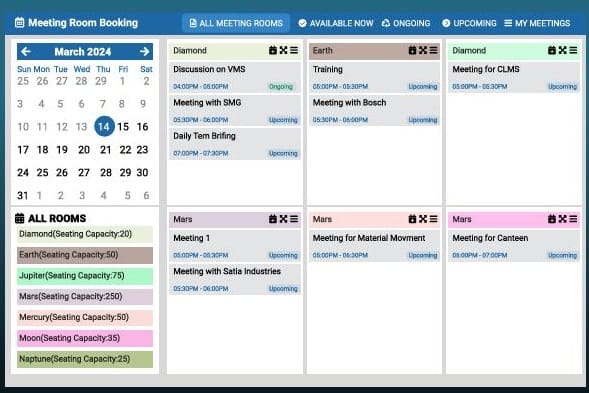
Today's Timeline
9:00 AM
Team Standup
11:00 AM
Product Review
3:00 PM
Client Call

Our Clients

Everything you need to run a smarter workplace

From real-time availability to deep analytics, we cover every step of your meeting room management journey.

Efficient Resource Management

Real-time visibility into room availability prevents double bookings and maximizes space usage across your entire facility.

🕐

Time-Saving Bookings

A centralized platform replaces manual emails. Check availability and reserve a room in seconds, from any device.

🔔

No More Conflicts

Clear scheduling overviews and smart notifications eliminate disruptions, ensuring smooth and productive meetings.

💰

Cost Savings

Optimize space utilization and cut overhead costs linked to underutilized rooms. Make every square foot count.

📊

Insights & Analytics

Detailed reports on peak usage times, space utilization trends, and booking patterns help you plan smarter.

🤝

Enhanced Collaboration

Invite colleagues and visitors, specify meeting needs, and sync with calendar systems for seamless scheduling.

Powerful tools, beautifully designed

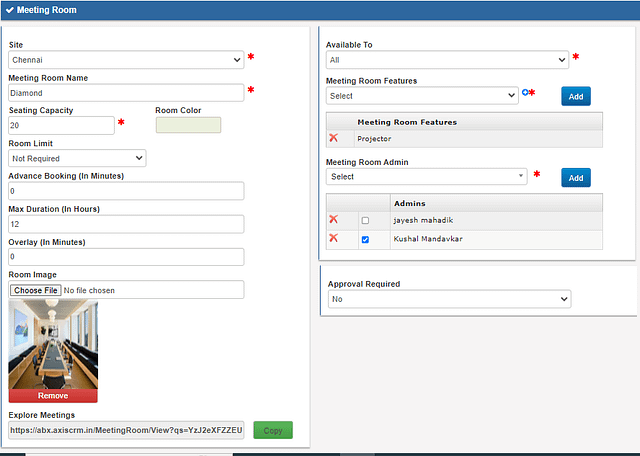
Room Configuration Panel
Room NameBoardroom A
Seating Capacity12 people
Max Bookings / Day6 sessions
Access LevelManagement Only
Facilities
ProjectorAV SystemCoffee
Approval Required✓ Yes

Tailor every room to your organization

Define seating capacity, booking limits, access restrictions, and available amenities for each room individually.

  • Seating & Capacity RulesSet the max occupancy and daily/weekly meeting limits per room.
  • Department-Level AccessRestrict rooms to specific teams, departments, or designations.
  • Amenities CatalogueList AV equipment, projectors, tea/coffee makers and more for each room.
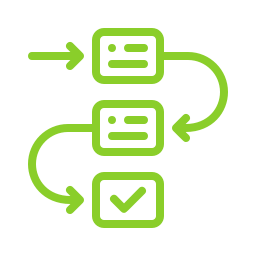
Booking Approval Workflow
1

Submit Booking Request

User selects room, time slot, and invitees with specific requirements.

2

Level 1 Review

Department head reviews and approves or suggests an alternate slot.

3

Admin Confirmation

Room admin performs final approval; email & SMS notifications sent.

Booking Confirmed

Calendar invite dispatched. Room locked in for all invitees.

Two-level approvals, zero confusion

A structured workflow ensures every booking is reviewed, confirmed, and communicated — from request to check-in.

  • Invite Colleagues & VisitorsAdd co-workers and external guests directly from the booking form.
  • Reschedule, Extend, or CancelFlexible controls let organizers adapt meetings without losing the room.
  • Email & SMS NotificationsAll participants are notified automatically at every stage of the booking.
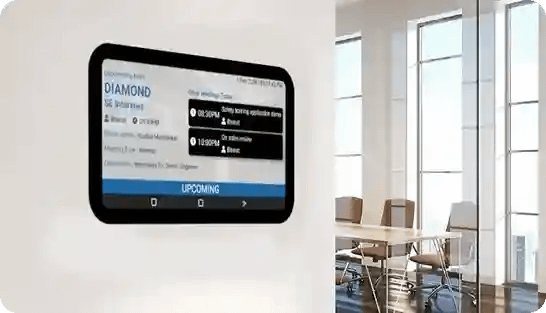
Meeting Room External Display
Boardroom A · Floor 5
Available Now
CURRENT MEETING
Quarterly Strategy Review — Finance Team
2:00 PM – 3:30 PM · Organizer: Priya Mehta
UPCOMING
Product Roadmap Sync4:00 PM
Vendor Meeting5:30 PM

Real-time displays at every entrance

Fixed displays outside each room and wall-mounted screens inside buildings show live meeting data at a glance.

  • Room Entrance DisplayShows current and upcoming meetings, availability status, and room name.
  • Floor-Level Meeting BoardWall-mounted screens show all meetings for a specific floor or building.
  • Corporate SignageIntegrate with your corporate branding for a seamless display experience.

What is Meeting room booking software and why should you use it?

Meeting room booking software can simplify the process of reserving meeting rooms, conference spaces. It streamlines the entire process, from checking room availability to making reservations, managing bookings, and providing insights into space utilization. Here is why you should use a Meeting room booking software:

  • Efficient Resource Management: Optimize the utilization of meeting rooms by providing real-time visibility into room availability, preventing double bookings, and maximizing space usage.
  • Time-Saving: Instead of relying on manual processes or emails to book meeting rooms, the software offers a centralized platform where users can quickly check availability and make reservations, saving time and effort for both employees and administrative staff.
  • Reduced Conflicts and Disruptions: By offering a clear overview of room availability and scheduling conflicts, the software helps minimize disruptions and conflicts, ensuring smooth and productive meetings.
  • Enhanced Collaboration: With features like booking reminders, room amenities, and integration with calendar systems(proposed), meeting room booking software makes it easier to schedule and plan meetings efficiently.
  • Cost Savings: By optimizing space utilization and reducing wasted resources, organizations can save on overhead costs associated with underutilized meeting rooms or unnecessary space expansion.
  • Insights and Analytics: The reports provide valuable insights into space utilization trends, peak usage times, and areas for improvement.

Meeting room Configuration

  • Seating capacity
  • Max meetings per day, week or month,
  • Usage restrictions & approvals (available to a select group – department or designation)
  • Facilities available in the meeting room (AV equipment, projector, tea/coffee maker etc )

Meeting room Dashboard

  • Ongoing and upcoming meetings.
  • Vacant meeting rooms
  • Features and facilities available in the meeting rooms
  • My bookings – users can view upcoming and past meetings.
  • Approvals – Meeting room admins ca approve or reject booking requests

Booking workflow

  • Raise a meeting room booking request
  • Invite co-workers & visitors to join the meeting.
  • Mention specific needs for the meeting.
  • Two-level Approval Workflow
  • Reschedule, Cancel or extend the Meeting
  • Email & SMS notifications

Meeting Room External Display

Fixed at every meeting room entrance.
Displays Meeting room name with current & upcoming meetings

Meeting Information Display

  • Wall mounted large screen display
  • Shows scrolling list of upcoming meetings.
  • List of location based meeting rooms. For e.g. upcoming meetings on 5th floor in the admin building.
Corporate Signage

Other Interesting Features

  • Calendar Integration:-Syncs with calendars like Google Calendar, Outlook (Proposed).
  • Customizable Booking Rules:-Admins can set rules for booking, such as maximum duration, advance booking limits, recurring bookings, etc.
  • Room Details and Amenities:-Admins can set rules for booking, such as maximum duration, advance booking limits, recurring bookings, etc.
  • User Permissions:-Different levels of access for users, admins, and managers, allowing control over who can book which rooms and for how long
  • Notifications and Reminders:-Sends automatic notifications for booking confirmations, reminders before the meeting, and alerts for any changes or cancellations.
  • Reporting and Analytics:-Generates reports on room utilisation, popular time slots, and frequently used rooms, helping optimise space allocation
  • Integration with Facilities Management:-Connects with facilities management systems to report issues, request maintenance, or provide feedback on room conditions.
  • Mobile Accessibility:-Accessible via mobile devices to book or manage rooms remotely, catering to on-the-go scheduling needs
  • Check-in/Check-out:-Allows users to mark their presence when they start and finish meetings, ensuring better room utilization and tracking no-shows
  • Multi-location Support:-Manages bookings across multiple locations or branches, enabling centralized control and visibility.
QUICK INQUIRY

    Disclaimer: The features and functionalities listed here are licence, version, device and module dependent. Some of the features may be in development/testing/prototype phase and may require additional development effort, time and cost to be available in production environment. Some of the features are tailor made for specific installations and may not be available in the standard application. 

    Bring in effortless operations

    Get started with most reliable, comprehensive, and easy to implement Facility Management Solutions designed with user friendly technology experience.

    1500+

    Total Installations

    25000+

    Total Users

    25+

    Years of experience

    80+

    Applications Developed

    90% +

    Customer Retention

    Other Management Services